Learning Intention
- I can use a variable to make a robot speak a count
- I can use a conditional to make a robot count up to a certain value
Introduction
What did we learn to do last week? (make a variable called 'Count' to keep a count in ones, twos, fives and tens and make Ohbot start counting from a set number.) Today, we are going to continue with our work on the variable 'Count' to make Ohbot continue counting until it reaches a certain number. We will start by getting Ohbot to say the number it is counting.
Teacher Input
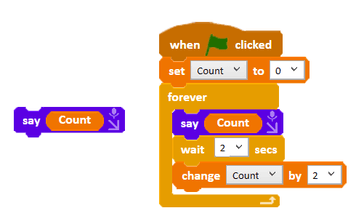
Ask children to create a program that counts up in 2s. Can they work out how to make Ohbot speak the value of the count variable? This can be achieved by dragging the variable 'Count' into the say instruction. Once successful the children can open up the code they wrote last week and add the say instruction so that Ohbot speaks in all the counting tasks.
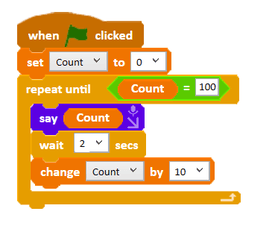
Can you make Ohbot stop counting when it reaches 100? There are a number of ways of doing this. Children may suggest using repeat. To make Ohbot stop counting when it gets to 100, which part of the code do you think we have to change? (We need to go to the Control palette and change the forever instruction to a repeat until instruction.) We will need an operator to fit inside the empty hexagon. Have a look on the Operator palette to see which operator you think we need. What do you think needs to go in the operator's two spaces? Also remember to have the tick next to 'Count' on the Data palette to watch the counting. Save the project as 'count up to 100'. We can now use this knowledge to complete other counting tasks.
Activities
Can you write a program that counts up in 2s and makes Ohbot speak the value of the Count variable?
Can you make Ohbot stop counting when it reaches 100?
Can you make Ohbot count back in tens? Ohbot must start at 200 and stop when it gets to 100.
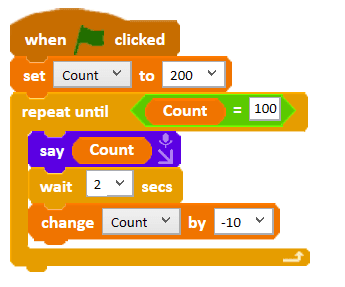
Can you make Ohbot count back in fives? Ohbot must start at 250 and stop when it gets to 200.
Can you make Ohbot count back in twos? Ohbot must start at 100 and stop when it gets to 20.
Extension
Can you make Ohbot open and close its mouth while it is counting so it appears to talk?
Plenary
Encourage children to share their scripts for making Ohbot move its lips as it speaks. Which are the most effective?
Key Points
- Drag a variable into a `say` instruction to make Ohbot speak its value.
- The `repeat until` instruction (Control palette) runs a loop until a condition becomes true.
- A hexagonal operator from the Operators palette fits into the empty hexagon to build the condition.
- Use a `change Count by -1` style instruction to count backwards.
- Tick the box next to a variable on the Data palette to watch its value on screen.
Need Help?
If you're stuck on any part of this lesson, check out these resources: