Learning Intention
- I can use a variable to make Ohbot count.
Introduction
Explain that we are going to make Ohbot count. For this we are going to be creating a program that uses a variable. You might want to discuss the use of a variable to keep and alter a score in a computer game. BBC Bitesize also has a handy explanation here http://www.bbc.co.uk/guides/zw3dwmn.
Teacher Input
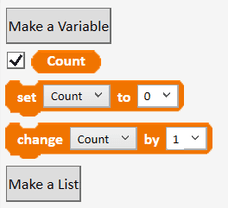
Explain that we are going to make Ohbot count. For this we are going to be creating a program that uses a variable. You might want to discuss the use of a variable to keep and alter a score in a computer game. BBC Bitesize also has a handy explanation here http://www.bbc.co.uk/guides/zw3dwmn.
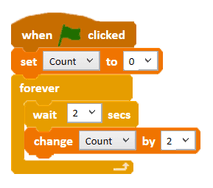
To start with we need to set the value of the variable. We can start our program with a when green flag clicked instruction. First, we need a set Count to 0 instruction. This means we will start counting at zero. Next, we need to make a loop where we continually increase the value of 'count' by 1. We do this using a forever instruction and a change Count by instruction with the value set to 1. We now need to test our code by clicking the green flag. Once successful, we can File, Save As - 'count in ones'. We can now use our first variable program as a skeleton to make other counting programs using a variable.
Activities
Can you write some code to make Ohbot count in twos?
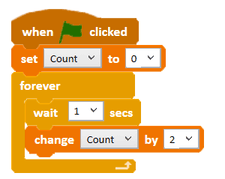
Can you write some code to make Ohbot count in fives?
Can you write some code to make Ohbot count in tens?
Can you write some code to make Ohbot count in a 3 digit number?
Can you write some code to make Ohbot count in a 4 digit number?
Extension
Can you change the number that Ohbot starts counting from? Can you make Ohbot count in ones starting from 20?
If Ohbot wants to start counting from 20, which part of the code do you think we have to change? (set Count to). Remember to set the tick next to 'Count' on the Data palette so you can watch the counting in the display. Save the project - File, Save As - 'count from 20'. We can now use this knowledge to complete other counting tasks?
Can you make Ohbot count in twos starting from 30?
Can you make Ohbot count in fives starting from 25?
Can you make Ohbot count in tens starting from 100?
Can you make Ohbot count in 125's starting from 1000?
Plenary
Encourage children to share their programs with the class and discuss ones that don't work, work partially or have used a different algorithm to reach the same outcome. Encourage children to talk through how they work block by block and work as a class to debug a program to improve it.
Key Points
- A variable stores a value that your program can read and change as it runs.
- Create one with Make a Variable on the Data palette.
- `set [Count] to 0` gives the variable its starting value.
- `change [Count] by 1` increases it each time round the loop; change the step to count in twos, fives or tens.
- Tick the box next to a variable on the Data palette to watch its value on screen.
- Changing the `set` value makes Ohbot start counting from a different number.
Need Help?
If you're stuck on any part of this lesson, check out these resources: