Learning Intention
- I can program a robot to perform multiple tasks simultaneously.
Introduction
What did we learn to do in the last lesson? (Use repeat). This week we will use repeat again. In addition, we will see that Ohbot can do two things at the same time! We will learn to write two scripts that will run at the same time in the same program so that Ohbot can perform two tasks simultaneously. What do you think the word simultaneously means? Ask children to stand up. Can they nod their head and clap their hands at the same time? They are performing two tasks simultaneously! What other moves can they perform simultaneously? What moves could Ohbot perform simultaneously?
Teacher Input
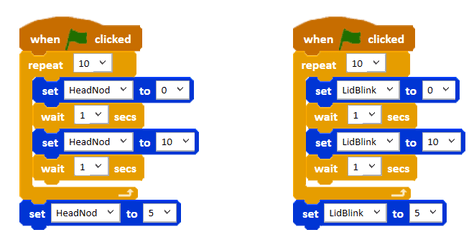
Ask the children to open the Ohbot program on their computer and go to New on the File menu to create a blank program. Explain that we can have two sequences of code in one program similar to when we used the keyboard to control Ohbot. However, both sequences will start with when green flag clicked and work simultaneously. Drag two, when green flag clicked instructions, into the new file. Explain that you can write a sequence of code below both instruction. Children work through the tasks on the slides.
Activities
Can you write some code to make Ohbot's head nod five times while Ohbot also blinks five times?
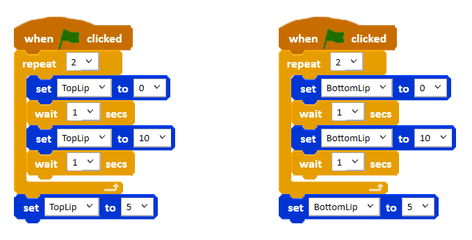
Can you write some code to make Ohbot's head turn left and right ten times while Ohbot also turns his eyes left and right ten times?
Can you write some code to make Ohbot yawn twice?
Extension
Can you write your own program in which Ohbot performs three moves simultaneously!
Plenary
Who successfully programmed Ohbot to perform two tasks simultaneously? Did anyone complete the extension? Which three tasks work well together?
Questions:
- How did you find today's lesson? (Thumbs up, down, middle).
Key Points
- Ohbot can perform multiple tasks simultaneously (at the same time).
- To make Ohbot do multiple things at once, use multiple `when green flag clicked` event blocks in the same program.
- Each `when green flag clicked` block starts a separate script that runs concurrently with others.
- You can combine this with `repeat` blocks to make simultaneous actions happen multiple times.
- Experiment to see which movements work well together simultaneously.
Need Help?
If you're stuck on any part of this lesson, check out these resources: