Learning Intention
- I can refine a program by using the repeat instruction.
Introduction
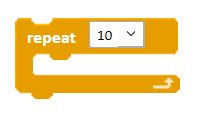
What did we learn to do in the previous session? (Use the keyboard to control Ohbot). Remember when we use the keyboard to control Ohbot, Ohbot's head will only continue to move up and down as long as the N (for nod) key is being pressed. Consequently, if you press N again and again, Ohbot will nod again and again. However, in programming this is not the most efficient way to perform an instruction multiple times. Look at the Control palette, can you see an instruction that could help us? We need to use the repeat instruction. This week we will learn to write code using repeat.
Teacher Input
Ask the children to open the Ohbot application on their computer and go to New on the File menu to create a blank program.
Let's see if we can find repeat. Go to the Control palette and drag out a repeat instruction.
Demonstrate that the number can be changed to set the number of times the code inside the loop is repeated.
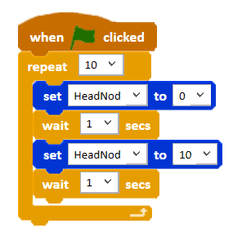
Can you write some code to make Ohbot's head move up and down 10 times? How many times do you need to repeat the code? (10).
Select Save As from the File menu - name the program 'head nod with repeat'.
Activities
Write a program to make Ohbot's head move up and down 10 times.
Can you write some code to help Ohbot cross the road? Ohbot needs to look left and right twice while it is on the kerb and then straight ahead while it crosses the road.
Can you write some code for Ohbot to perform a sequence of movements one after the other? E.g. nod twice, shake twice then blink twice.
Extension
Can you write your own keep fit sequence for Ohbot with at least 3 moves and using repeat? File, Save As - 'keep fit'
Plenary
Remember that programmers can be quite lazy so repeats are perfect for them because they mean shorter programs and less work!
Questions:
- How did you find today's lesson? (Thumbs up, down, middle).

Key Points
- Pressing keys repeatedly is inefficient for repeated actions.
- The `repeat [number]` block is found in the Control palette.
- Code placed inside the `repeat` block will run the specified number of times.
- The number in the `repeat` block can be changed.
- Use `repeat` to make sequences like nodding, shaking, or blinking happen multiple times.
- `repeat` makes programs shorter and more efficient.
- Remember to save your work using File > Save As.
Need Help?
If you're stuck on any part of this lesson, check out these resources: