Learning Intention
- I can program a robot to move when keys are pressed.
Introduction
How do you control players when playing computer games? One way is using a computer keyboard with different keys triggering the computer game sprite to carry out different movements such as jumping. We are going to write programs to make Ohbot carry out different sequences of movements when different keys are pressed.
Teacher Input
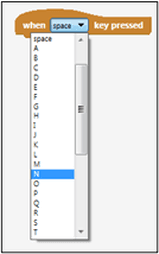
Let's make Ohbot nod once whenever the N key is pressed. First we will start with an event instruction. In the last lesson we used the When green flag clicked event block to start our sequence. This time we are going to use When___ Key Pressed. Use the drop down menu to select N as the trigger key.
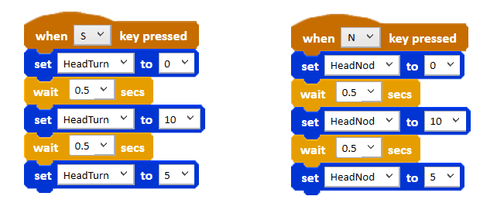
The scripts will be similar to those created in the previous lesson. Use 10 and 0 for maximum movements in either direction and 5 tol bring Ohbot back to the middle point.
Work through the N for nod instructions with the children. Ask the children to write the code for S for shake by themselves using the N for nod code as a skeleton.
Select Save As from the File menu and save the program with the name 'keyboard N and S'. Children to now work through tasks on slides.
Activities
Write a program to make Ohbot's eyes look up and down when U is pressed and look left and right when L is pressed.
Extension
Can you write the code to control Ohbot's lips using the keyboard? T for top lip and B for bottom lip.
Plenary
When we use the keyboard to control Ohbot, Ohbot's head will continue to move up and down as long as the N (for nod) key is being pressed. Consequently, if you press N again and again Ohbot will nod again and again. However, in programming this is not the most efficient way to get a robot to perform an instruction multiple times. Have a look around in the Ohbot instructions to see if you can find a more efficient way to perform movements again and again? We need to use the repeat instruction from the Control palette. Next week we learn to write code using repeat.
Questions:
- What block did we use today to start the code instead of the green flag?
- How is using a key press different from using the green flag?
- What is a more efficient way to make a movement happen multiple times?
Key Points
- Use the `When [key] Key Pressed` event block to trigger actions from the keyboard.
- Different keys can trigger different sequences of movements.
- Combine event blocks with motion and control blocks learned previously.
- Saving programs allows you to build on previous work.
- The `repeat` block (Control palette) is used for performing actions multiple times efficiently.
Need Help?
If you're stuck on any part of this lesson, check out these resources: