Learning Intention
- I can use broadcast to structure a longer program
Introduction
If we want something to happen in our program over and over again we can use the repeat command. But what if we didn't want to repeat the part immediately, but at a later point? A repeat won't do the job. Instead we can use the broadcast command — it allows us to have a sequence of instructions that we call up whenever we want them to run. Let's use it to make Picoh perform a rhyme that has some repeated parts. Teach children the Boom-Snap-Clap rhyme: Boom, Snap, Clap, Boom, Boom, Snap, Clap, Snap, Boom, Snap, Clap, Boom, Boom, Snap, Shhh.
Teacher Input
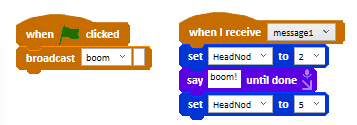
Ask children to predict what this program will do when the green flag is clicked. Did it do what they expected? Can they identify the bug in the program? The broadcast message name, 'boom', and the `when I receive` message name, 'message1', do not match. They need to match in order for the broadcast to trigger the `when I receive` event.
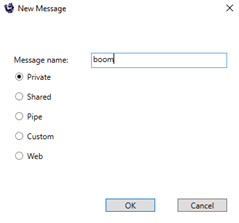
Ask each student to choose one of the words from the rhyme: 'Boom', 'Snap', 'Clap' or 'Shh'. Demonstrate how to create a new broadcast message — on the Events menu, click New Message, type the word as the message name and click OK.
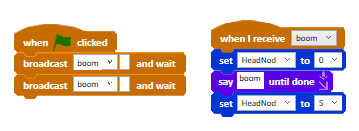
Show two `broadcast and wait` blocks to make Picoh perform the boom action twice. Challenge children to create movements and speech for each of the words of the rhyme and then use a sequence of broadcast commands to start each.
Activities
Ask students to program Picoh to say and make a movement to match their chosen word when the green flag is clicked. You might want to try the whole class performing the rhyme on their robots, with students manually operating their robots to say the lines.
Extension
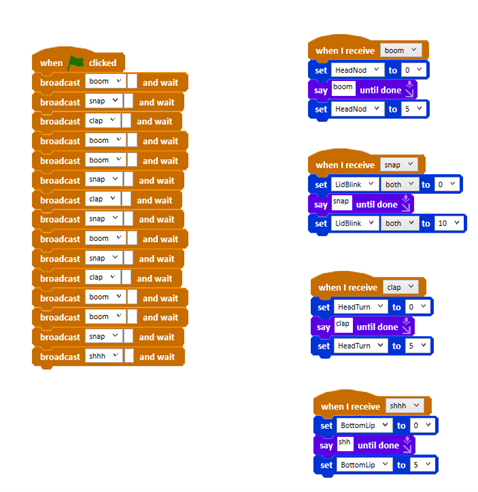
Can you find a way of making Picoh perform the poem using the smallest possible number of blocks? There are a number of possible ways to do this. Children could try creating a broadcast command that triggers a commonly used sequence of words as a way of reducing the number of broadcast and wait commands.
Plenary
How did you find today's lesson? (Thumbs up, down, middle). Show your partner today's program.
Questions:
- Does Picoh perform the rhyme expressively?

Key Points
- Broadcast lets you call up a sequence whenever you want it, not just immediately.
- The broadcast name and the `when I receive` name must match exactly.
- `broadcast and wait` finishes the received sequence before carrying on.
- Reusing broadcasts keeps a repetitive program much shorter.
Need Help?
If you're stuck on any part of this lesson, check out these resources: