Learning Intention
- I can broadcast a message
Introduction
This week we will learn to send a message from one block to another. This can be useful if you want to make one instruction in your program cause several things to happen, or if we want something to happen often but not consecutively. We will create a program that broadcasts a message called 'welldone'.
Teacher Input

First, we need to go to the Events palette and use New Message to create a message which we will call 'welldone'.
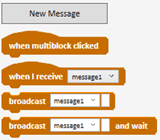
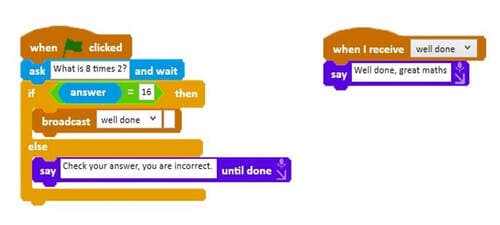
Picoh will ask the question 'What is 8x2?' and wait for an answer to be typed in. If the answer is 16 then it will broadcast our message 'welldone'. Initially our broadcast will be Picoh saying a congratulatory message. If the answer is anything other than 16 it will give a different response. File, Save As - broadcastwelldone
Activities
Can you write a program to broadcast your own message?
Extension
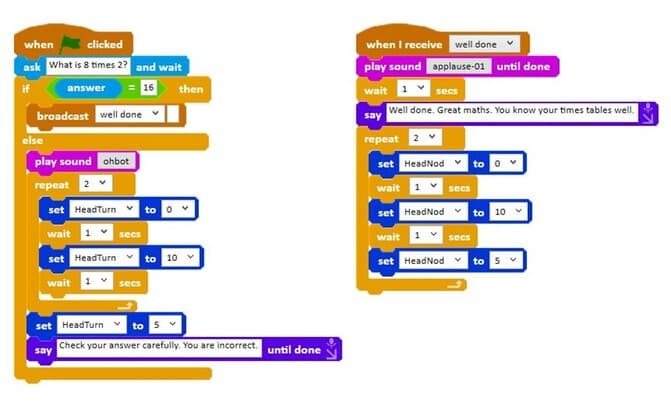
We can take this one step further by adding sound and motion instructions to the broadcast to make Picoh's response a little more dramatic. We can broadcast a round of applause and a head nod. Similar to our programs in the last lesson, can you write a program to make Picoh make a sound and nod its head when it receives the message 'welldone'?
Plenary
Questions:
- How did you find today's lesson?
Key Points
- Broadcasting sends a message from one sequence of code to start another.
- Create messages with New Message on the Events palette.
- `broadcast [message]` sends it; `when I receive [message]` responds to it.
- One instruction can make several things happen at once.
- Broadcasts work well with conditionals to react to a right or wrong answer.
Need Help?
If you're stuck on any part of this lesson, check out these resources: