Project
Jokerbot 2
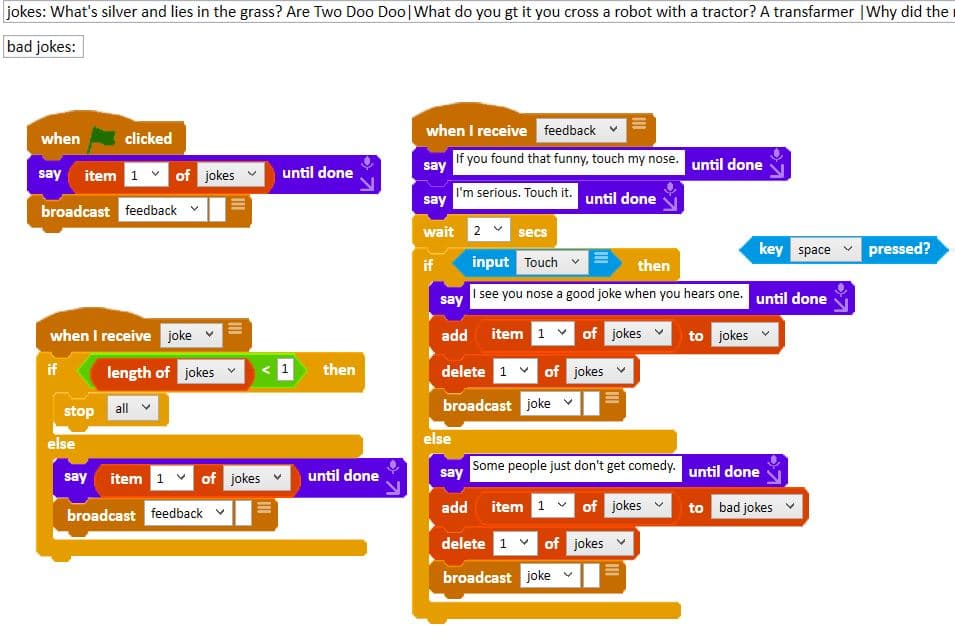
Ohbot tells a nose joke when you touch its nose. Run the code and make it your own.
Run it in the Ohbot App
- 1
Requires the Ohbot or Picoh Windows app.
- 2
Download the Oh_Nose_Jokes file.
- 3
In the Ohbot or Picoh app select File and 'Open Ohbiverse Download' to open the Oh_Nose_Jokes file.
- 4
If you don't have a physical Ohbot or Picoh you can see the code output on the Ohbot simulation in the app. As the touch sensor won't work in the simulation you may wish to replace the `Input Touch` block with a `key Space pressed?` block.
- 5
Modify the code as much as you like.
Sharing your code
- You'll need a free Ohbiverse account in order to share. Create one here.
- Any code uploaded to Ohbiverse is moderated for rude words and personal data before it is published.