Project
Jokerbot
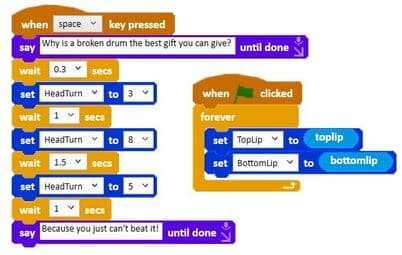
Run the code we used for our joke.
Run it in the Ohbot App
- 1
Requires the Ohbot or Picoh Windows app.
- 2
Download the JokeCode file.
- 3
In the Ohbot or Picoh app select File and 'Open Ohbiverse Download' to open the JokeCode file.
- 4
If you don't have a physical Ohbot or Picoh you can see the code output on the simulated robot in the app.
- 5
Modify the code as much as you like!
Sharing your code
- You'll need a free Ohbiverse account in order to share. Create one here.
- Any code uploaded to Ohbiverse is moderated for rude words and personal data before it is published.