Learning Intention
- I can write a program that uses a variable to make Picoh appear sleepy
Introduction
This week we are going to build on the skills we learnt in Year 4, using variables. We will Make a Variable and use this to control how sleepy or wide awake Picoh acts.
Teacher Input
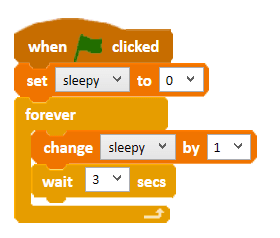
We will build up the project in stages. Each stage will build upon the code we have written in the previous stage.
Activities
In the first stage we need to Make a Variable called 'sleepy' which will count up in ones starting from 0.
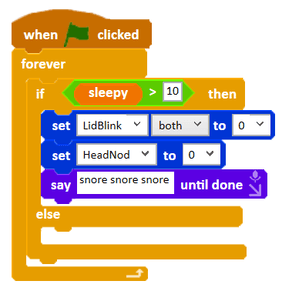
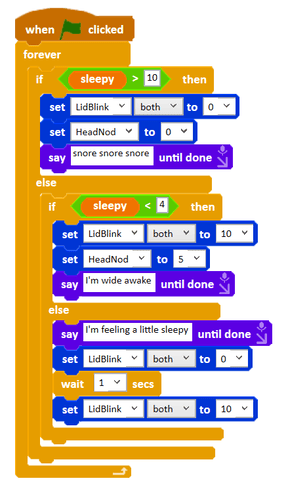
We will add an if-then-else condition instruction and sense when the value of sleepy is greater than 10. Whenever it is, it will make Picoh go to sleep. We can put what we want Picoh to do when it sleeps into the 'then' part of the conditional. Here we make it nod its head, close its eyelids and say 'Snore Snore Snore'. Encourage children to choose code to show Picoh sleeping.
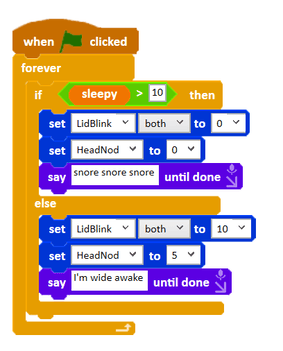
We need to think about what happens to Picoh when Picoh is not asleep. We can put the code to make Picoh awake in the 'else' part of the conditional. In this case we've made Picoh open its eyes, nod its head up and say that it's wide awake. Challenge children to think about how they can show Picoh is awake and add their code to the else condition.
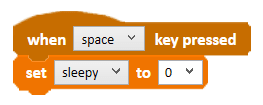
What if we wanted to wake Picoh up? Can you think of how you could use a keyboard event to wake Picoh up? Children might want to play a sound to 'wake' Picoh up. Perhaps children can program Picoh to look surprised when it wakes up?
Extension
Can you write code to make Picoh appear a bit tired when the sleepy variable has a value between 5 and 10?
Plenary
Take a look at the children's own projects.
Questions:
- Were they successful?
Key Points
- A variable can model an internal state such as how sleepy Picoh is.
- Build a larger project in stages, each extending the last.
- `if-then-else` selects between asleep and awake behaviour.
- A keyboard event can reset the variable to wake Picoh up.
- Testing for a range adds a third, in-between behaviour.
Need Help?
If you're stuck on any part of this lesson, check out these resources: