Learning Intention
- I can program a robot to sense the position of a mouse to set its position
Introduction
This will be our final unit of work on Robotics. What projects did you cover in Sequence 3? We will start Sequence 4 with another movement project. What ways have we learnt to make Picoh move? (Simple movements, using the keyboard and simultaneous movements all in Sequence 1. In Sequence 2 we looked at random movements. In Sequence 3 Picoh moved in response to questions and answers.) In Sequence 4 we are going to start with 'Wizard of Oz' robotics. This is where a human is used to simulate the response of the robot, like the film Wizard of Oz, when the wizard was operating the robot from behind a curtain.
Teacher Input
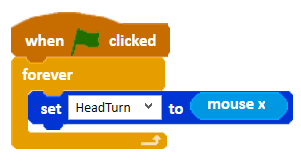
We are going to make Picoh move like a puppet. We will do this by getting Picoh to react to a sensor. The `Mouse X` sensor block (in the light blue Sensor menu) gives the position of the mouse in the x axis as a number between 0 and 10. The `Mouse Y` sensor block does the same for the y axis. We will start with the very simplest puppet movement: using the mouse to control turning the head from side to side.
Activities
Can you write a program that allows the mouse to control Picoh's head turn and head nod motors?
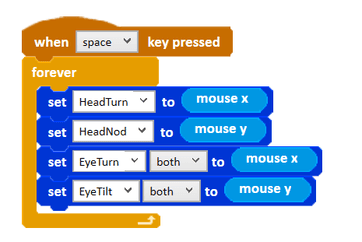
Can you add code to your program so that the mouse controls Picoh's eye turn and eye tilt motors too?
Can you experiment with using the mouse and other sensor blocks to control Picoh's mouth?
Extension
Encourage the children to think about controlling Picoh as a robot puppet. Can they script a performance in which Picoh speaks and moves?
Plenary
Take a look at the children's own projects.
Questions:
- How did you use the 'Wizard of Oz' control?
- Were you able to successfully write the code to achieve your idea?
Key Points
- 'Wizard of Oz' robotics uses a human to simulate the robot's responses.
- `Mouse X` and `Mouse Y` report the mouse position as a number between 0 and 10.
- Sensor values can feed straight into motor position instructions.
- The sensor range matches Picoh's motor position range.
Need Help?
If you're stuck on any part of this lesson, check out these resources: