Learning Intention
- I can work with two variables
Introduction
What did we learn to do last week? (We learnt how to use a say instruction to speak the variable Count, and we completed some additional counting challenges using variables.) Today we are going to continue with our work on variables. What is a variable? We will be creating some new variables to count Picoh's movements. This will link up with the movement tasks we completed in Year 3 and all the work we have covered on the variable Count in Year 4.
Teacher Input
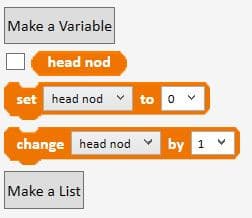
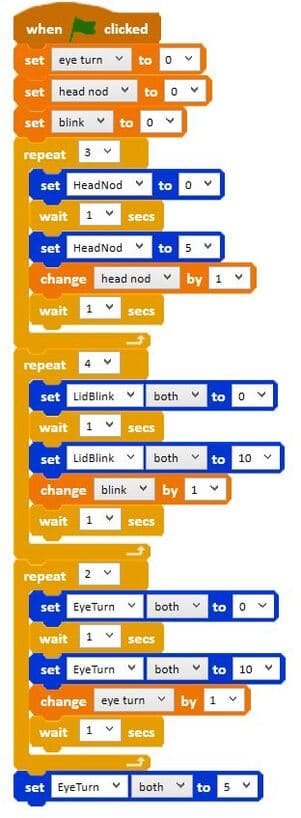
We are now going to use Make a Variable to create a variable called 'head nod'. This variable will be used to count the number of times Picoh moves its head up and down in a task. Remember to have the tick next to 'head nod' on the Data palette to watch the counting.
If we use a repeat instruction with a count of 2, how many times will Picoh nod? (2.) Therefore the 'head nod' count will go up to two. If we use a count of 10, how many times will Picoh nod? (10.) Therefore the count will go up to 10.
Activities
Can you write a program that uses repeat to make Picoh nod its head a number of times?
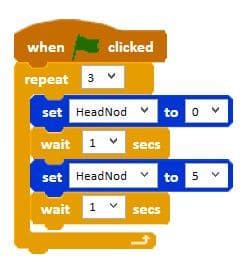
Can you write some code to make Picoh count the number of times it nods its head? You can explore the code by changing the number of repeats. File, Save As - countheadnod
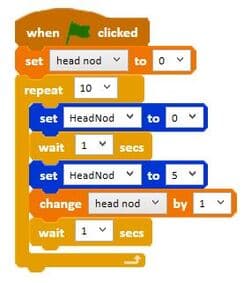
Can you write a program to make Picoh count the number of times it blinks? File, Save As - countblink
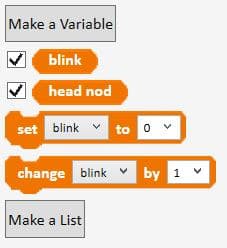
Extension
Can you make three variables for Picoh's keep fit routine? Can you write a script to make Picoh count the number of times it nods its head, shakes its head and looks up and down with its eyes? File, Save As - countkeepfit
Plenary
Encourage children to share their programs with the class and discuss ones that don't work, work partially, or have used a different algorithm to reach the same outcome. Encourage children to talk through how they work block by block and work as a class to debug a program to improve it.
Key Points
- A program can track several variables at the same time.
- Name variables after what they count to keep code readable.
- A `repeat` count determines how far the matching counter variable will climb.
- Tick each variable on the Data palette to watch them all change.
Need Help?
If you're stuck on any part of this lesson, check out these resources: