Learning Intention
- I can incorporate variables into my program to make a robot behave like a robot pet.
Introduction
What did we do last week? (Make a variable called 'sleepy'.) This week we are going to build on the skills we learnt last week, using variables. Discuss robot pets that children might have come across and similarities to a real pet such as requiring 'feeding' and attention. We will create a robot pet with two needs: warmth and food. For each we will have a separate variable. One need will be to have been fed, we will call this one 'full tummy', and the other will be to be warm, we will call this 'warm'. Ohbot will respond to the variables in different ways depending on how hungry it is and how cold it is feeling. Full tummy will go from 10, which is full, to 0, which is empty, and warm will go from 10, which is warm, to 0, which is cold. Ask children to come up with the combinations that are possible and what the variable values might be for each: Warm 10 / Full Tummy 10; Warm 10 / Empty Tummy 0; Cold 0 / Full Tummy 10; Cold 0 / Empty Tummy 0.
Teacher Input
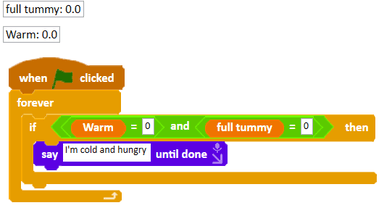
Return to the table from previously and challenge children to think about what Ohbot might say in each of the possible scenarios: Warm 10, Full Tummy 10 - 'I'm lovely and warm and full'; Warm 10, Empty Tummy 0 - 'I'm lovely and warm but I'm hungry'; Cold 0, Full Tummy 10 - 'I'm cold but I'm not hungry'; Cold 0, Empty Tummy 0 - 'I'm cold and hungry'. Model how to create a condition to check the values of the variables, and create a condition for one of the scenarios.
Activities
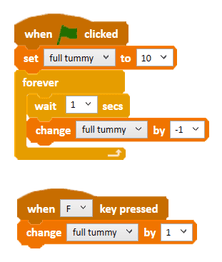
Ask children to think about what might happen to 'full tummy' over time. Challenge children to create a variable called 'full tummy' (remind them about putting a tick in the box next to the variable name to display its value) and make it decrease from 10 to zero over time. Can they find a way of providing food when the 'f' key is pressed?
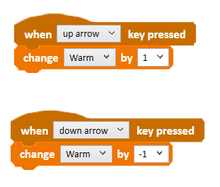
We will control warmth manually, just like setting the central heating at home. Can we create a variable called 'warm' that increases when one key is pressed and decreases when another is pressed?
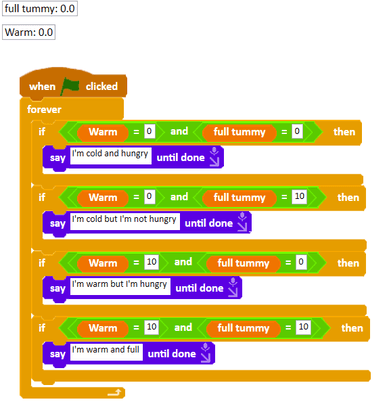
Challenge children to create if conditions for the other scenarios.
Extension
What happens when the values of 'warm' or 'full tummy' go outside the range 0 to 10? Can you find a way of limiting the value of the variables, or making Ohbot react in a different way if they go outside the range 0 to 10?
Plenary
Take a look at the children's own projects. How did you find today's lesson? (Thumbs up, down, middle)
Questions:
- Were they successful?
Key Points
- Two variables together describe four possible combinations of state.
- A variable can change on its own over time, or in response to a key press.
- Conditions can test more than one variable at once to pick the right response.
- Mapping out the scenarios first makes the conditions much easier to write.
- Guard against values drifting outside their intended range (0 to 10).
Need Help?
If you're stuck on any part of this lesson, check out these resources: