Learning Intention
- I can use broadcast in my programs to make Ohbot do several things at the same time
Introduction
What did we learn to do last week? (broadcast a message). We will build on our knowledge from last week's lesson on broadcast. Today we will broadcast some new messages related to movements, which will allow us to structure our code and change it easily. First, we will take another look at the Welcome2 program. Play the demonstration code to the children. This code has been written with some broadcast instructions. What messages have been broadcast? Today we are going to write our own version of the Welcome2 program using the broadcast instruction.
Teacher Input
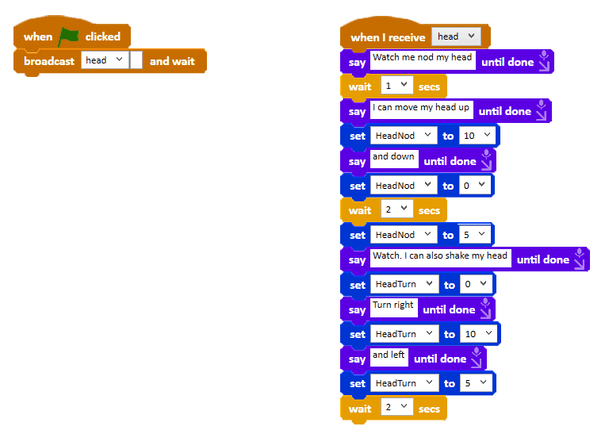
First, we need to go to the Events palette and create a new message which we will call 'head'. We will need to use the instructions `broadcast head and wait` and `when I receive head`, as well as the usual start instruction `when green flag clicked`. When the green flag is clicked we need to broadcast the 'head' message (and then wait for the head broadcast code to run). The `when I receive head` instruction will have a set of movements underneath that show off how Ohbot can move its head. File, Save As - 'broadcast head'.
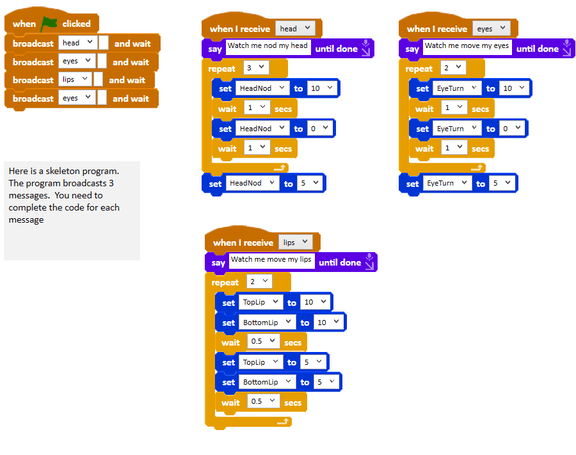
You can change the order of the broadcast instructions and make the sequences run in a different order. You can also run a sequence more than once without having to duplicate all the instructions. By using messages you can see that your code is easier to change and has a better structure.
Activities
We can have a series of broadcasts in one piece of code. Can you add multiple broadcasts to your code? (Next broadcast lips, then broadcast eyes, to demonstrate how all of Ohbot's 7 motors work.)
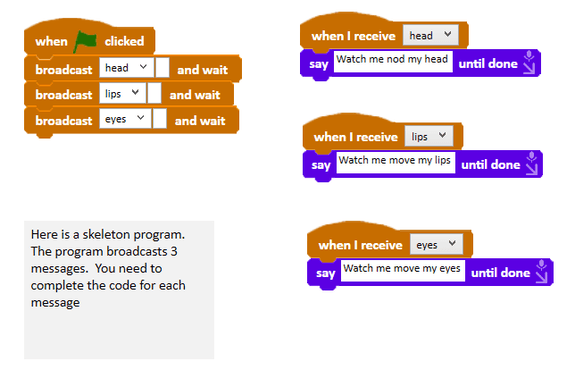
Can you make Ohbot move in a different order and repeat one of the sequences? File, Save As - 'broadcast 3 moves'.
Extension
Can you take this one step further by adding another broadcast at the start of the code? We will call this broadcast 'welcome'. Welcome needs to introduce Ohbot the robot and include sound effects.
Plenary
How did you find today's lesson? (Thumbs up, down, middle). Show your partner today's program.
Questions:
- Does your program show off Ohbot's movements fully?
Key Points
- `broadcast [message] and wait` waits for the receiving code to finish before continuing.
- Several broadcasts can be chained in one program to structure a longer performance.
- Reordering broadcast instructions reorders the sequences without rewriting them.
- A sequence can be run more than once without duplicating its instructions.
- Messages give your code a clearer structure and make it easier to change.
Need Help?
If you're stuck on any part of this lesson, check out these resources: