Learning Intention
- I can program a robot to repeat movements with a random wait between.
Introduction
How often do you blink? How long is a blink? Are there times when you blink more or less often? When and why? Could we make Ohbot blink and move a bit like we do?
Teacher Input
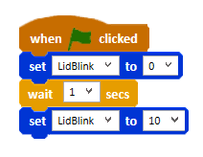
Let's start by making Ohbot blink once. Think about the eyelid motor (`LidBlink`). If the eyes start open, the motor is likely at position 10. To blink, it needs to close (position 0) and then open again (position 10). Remember to use `wait` blocks so we can see the movement.
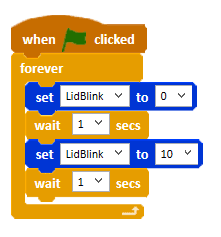
Now, how can we make Ohbot blink continuously? We'll need a loop block (like `forever` from the Control palette) around our blink sequence. We can adjust the `wait` time inside the loop to change how fast Ohbot blinks.
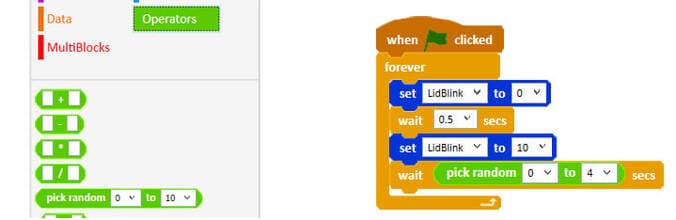
Do humans blink regularly like a clock? Not really! Blinking is often random. We can make Ohbot's blinking more realistic using the `pick random [1] to [10]` block found in the Operators palette. You can change the numbers to set the minimum and maximum wait time. Drag this block inside the `wait` block in your blinking loop.
Experiment by changing the range in the `pick random` block to see how it affects Ohbot's blinking. Try to make it look as natural as possible. We can use this same idea of random waits for other movements too.
Activities
Challenge children to write a program to make Ohbot's lids blink once when the green flag button is clicked. It might help to get children to think about the starting position of the lid blink. if Ohbot's eyelids start from open the LidBlink motor will be in position 10, so the first instruction to run will need to set the LidBlink motor to 0 to close Ohbot's eyelids.
Challenge children to alter their programs to make Ohbot blink continuously. Explore how the length and frequency of blinks can be altered by altering values of the wait instructions.
Discuss whether humans blink in this way. Introduce the idea of random wait between blinks. Introduce the pick random operator from the Operators palette. Explain that the two numbers in the operator set the range that the random number is picked from. Encourage children to introduce this into their program and investigate altering the values to make Ohbot's blinks as realistic as possible. We can now use our random blink program as a skeleton to make other parts of Ohbot move at random intervals.
Can you write a program so that Ohbot continuously nods its head with a random wait between nods?
Can you write a program so that Ohbot continuously shakes its head with a random wait between shakes?
Extension
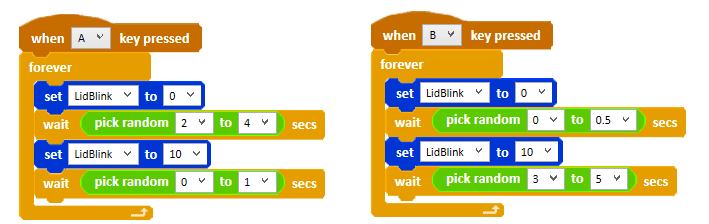
Challenge children to create a program that makes Ohbot have either alert (infrequent short blinks) or sleepy eyes (frequent long blinks)(see code sequence). They will need to use two random blocks within their code the second will set the frequency of the blinks and the first will set how long each blink lasts.
Plenary
Questions:
- What did you make Ohbot do?
- In which ways were your Ohbot's movements similar to and different from the way you move?

Key Points
- Ohbot's movements can be made less robotic by introducing randomness.
- The `LidBlink` motor controls the eyelids (0=closed, 10=open).
- Use loops (like `forever`) for continuous actions.
- The `pick random [min] to [max]` block (Operators palette) generates a random number in a specified range.
- Place `pick random` inside `wait` blocks to create variable delays between actions.
- Adjusting the range in `pick random` changes the randomness (e.g., `1` to `5` is different from `0.5` to `2`).
- Random waits can be applied to various movements like blinking, nodding, and shaking.
- You can use multiple random blocks to control different aspects of movement (e.g., duration and frequency).
Need Help?
If you're stuck on any part of this lesson, check out these resources: