Learning Intention
- I can test and debug my instructions.
Introduction
This week we will be testing all the programs we have written by running them on Ohbot the robot. If the programs do not make sense Ohbot will not work. If this is the case you need to debug the program and test it again until Ohbot the robot performs the moves you intended it to.
Teacher Input
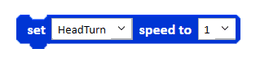
There are some differences between using the simulator in the Ohbot program and using a physical robot. On the Motion palette there's an instruction we have not yet used because it only applies to the physical robot. Which instruction do you think it is? (`set speed to`). The simulator works at a constant speed. However, the motors on the robot take some time to move. This instruction allows you to adjust the speed of the motor. Ohbot has 7 motors. Like all Ohbot instructions the value you can input ranges between 0 and 10.
As Ohbot needs more time to complete a move using a physical robot, you may need to increase the wait times to allow it to finish a move before it starts the next one, particularly if using `head nod` and `head turn` blocks together or in quick succession.
Ohbot is controlled by the code in the program. Remind children of the need to take turns when sharing the physical robot.
Divide the class into equal sized groups. Send them to the computer workstations where Ohbot the robot has been set up. Children to take it in turns to log on to the workstation and run 4 or 5 of the programs they have written this half term. Do the programs work? Can they debug the program to fix it? Children to take it in turns within the group to run their programs.
Activities
Test and debug the code you have written on the simulator, on the physical Ohbot the robot.
Extension
Can you add any new code to any of your programmes to improve them after testing on the real Ohbot?
Plenary
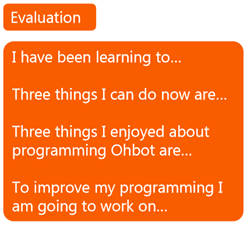
Evaluation of the Ohbot project. Children to complete the following feedback.
Questions:
- Reflect on the Ohbot project: What did you enjoy?
- What parts of programming Ohbot did you find challenging?
- What skills have you learned?
Key Points
- Debugging is the process of finding and fixing errors ('bugs') in your code.
- Testing programs on the physical Ohbot robot is crucial as it may behave differently from the simulator.
- The `set speed to [value]` block (Motion palette) controls motor speed on the physical robot (range 0-10); it does not affect the simulator.
- Physical robot motors take time to move; you may need to increase `wait` times in your code compared to simulator testing.
- Longer waits might be needed between head movements (`head nod`, `head turn`) on the physical robot.
- To debug: run the code, observe Ohbot, compare behavior to your intention, identify the error in the code, fix it, and test again.
- Remember to share and take turns when using physical hardware.
Need Help?
If you're stuck on any part of this lesson, check out these resources: