Learning Intention
- I can program a robot to say the date and time
Introduction

Look at your computer. Can you find the time and date displayed anywhere? Ask how the computer can display this. Can you make your Picoh speak the current time using a say block?
Teacher Input
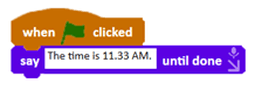
In this lesson we are going to learn to make Picoh speak the date and time. Because the time is always changing, for Picoh to always give the right time we would have to keep changing our program — or wait for the time to be right once a day! Either way it would not be a very useful clock. Instead we can use a variable that reports the current time, so that whenever a say block runs Picoh will always give the right time. Find the `current` block on the Sensing palette.

Try putting a tick next to the block to see the value displayed. The drop-down menu can be used to select from a range of different values. You'll notice that this block can report either numbers, such as the minutes or seconds, or words, such as days of the week.
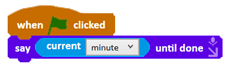
Can you experiment with instructions from the Speech palette to make Picoh talk? Let's write a program in which Picoh says the current minute. We need to start with the `say until done` instruction, then go to the Sensing palette and scroll down to find the `current` variable. The current variable has a drop-down menu and we need to select 'minute'. File, Save As - currentminute
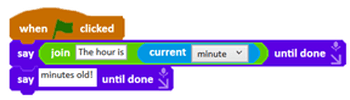
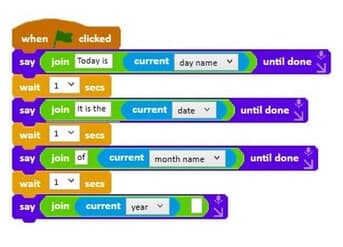
Picoh will now say the minute. However, if we go to the Operators palette and drag a `join` operator we can add our own text before the minute. We can now use this program as a skeleton to say other current pieces of information.
Activities
Can you write some code to speak the time including the hour, minute and second? File, Save As - currenttime
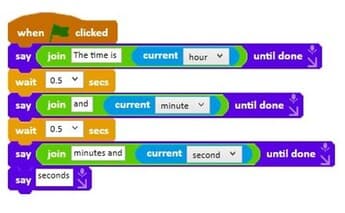
Extension
Can you write some code to say the day name, date, month name and year? File, Save As - currentdate
Plenary
Look at examples of the children's coding. Were they successful? Did they need to debug their code? Is everyone's code the same?
Key Points
- The `current` variable (Sensing palette) reports the date and time.
- Its drop-down selects year, month, date, day, hour, minute or second.
- It can report numbers or words depending on what you select.
- `say until done` makes Picoh finish speaking before the next instruction.
- The `join` operator combines your own text with a variable's value.
Need Help?
If you're stuck on any part of this lesson, check out these resources: