Learning Intention
- I can use random numbers to change how a robot behaves
Introduction
How did we make Picoh move in the last lesson? We made Picoh move a bit like us by using the `pick random` operator to make a random wait between movements. This week we are going to program Picoh to look scared. We are going to program Picoh to look around randomly.
Teacher Input
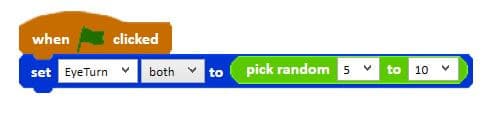
Share the code with children and ask them to predict what they think will happen each time the green flag is clicked. Discuss how the code can be changed to make Picoh move through the full range from 0 to 10. Ask children to predict what the code will do.
Activities
Children copy the code. Challenge them to alter the random ranges to make Picoh more relaxed or more nervous.
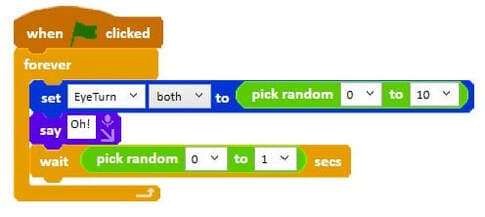
Write a program to make other parts of Picoh move randomly.
Extension
Experiment with the use of `pick random`. How many different ways can you use pick random to make Picoh's eyes move?
Plenary
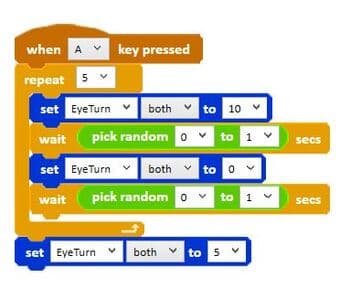
Look at the code for the three random solutions. What do you think each will do? What is being changed randomly in each piece of code? In A the time is random, in B the distance moved is random and in C the number of times the eyes move is random.
Key Points
- The range given to `pick random` changes how relaxed or nervous Picoh appears.
- Randomness can be applied to time, distance moved, or number of repetitions.
- Predicting what code will do before running it builds understanding.
- The same operator produces very different behaviour depending on where it is used.
Need Help?
If you're stuck on any part of this lesson, check out these resources: